Manage Dashboards
Manage Dashboard Options
The first time user logs in or the first time they use a selected Node, the dashboard will load a default dashboard layout.

The dashboard header has 3 drop downs for management from left to right:
- First drop down (Dashboard) - used to change dashboard in use or manage dashboards
- Second drop down (Nodes) - used to change the node currently in use
- Third drop down (Widgets) - used to manage widgets on current dashboard, add new widgets on current dashboard
Dashboard drop down
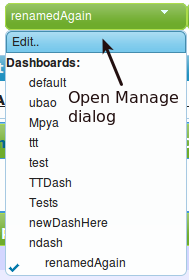
- The default selected value on the drop down is the currently in use dashboard
- The currently in use dashboard is also marked with a check mark
- The first option in the list will open a dialogue box to manage the dashboard for the user
- clicking on any of the other list items will load the dashboard selected
Edit menu ( Manage dashboards dialog)
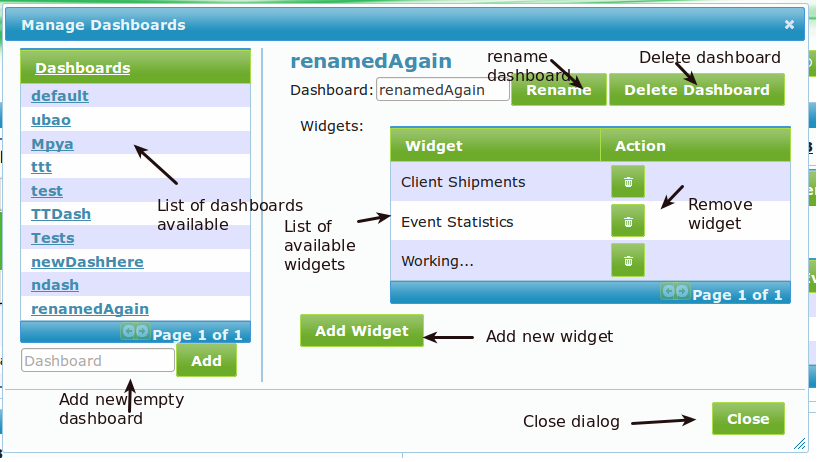
- The left section of the dialog box show the listing of the users dashboards
- clicking on any item will load the widgets list on the right side
- below the dashboard listing the user can type a new dashboard name in the text vox and click "Add" to add it, which will create an empty dashboard
- The name of the selected dashboard will appear on the top of the dialog and the user can rename the name by changing the value in the text box and click "Rename" button
- The user can also delete the selected dashboard by clicking on the "Delete Dashboard" button
- The user can delete widgets that are on a selected dashboard by clicking the delete icon
- "Close" button will close the dialog box
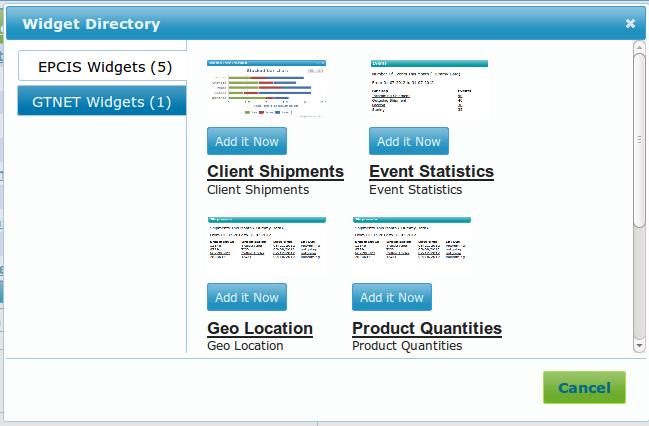
- "Add Widget" button will open a add widget directory to select which one to add to the selected dashboard as seen below
Nodes
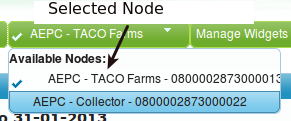
- The currently in use node name will be displayed as the default value on the drop down as well as marked with a check mark in the list
- clicking on any of the list items will load the node to be in use
Widgets
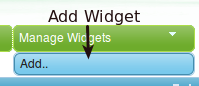
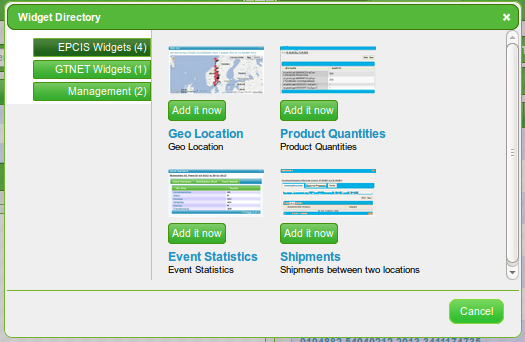
- Click on the option "Add" to add new widgets to the current dashboard
- This will open an add dialog directory to select a widget to add to the dashboard
- the widget will be loaded with default value where applicable