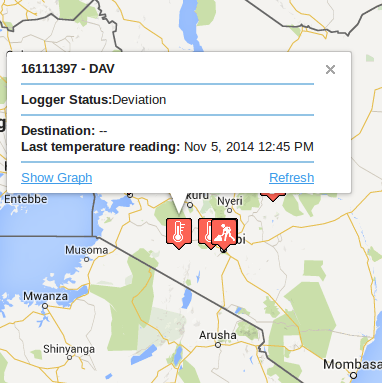
Temperature overview is a convenient way to have a snap preview of the status of temperature loggers and destinations. The following are displayed:
Temperature loggers - these are devices that report temperature events states. In a map they are shown as the icons below:
- Temperature logger is available.
- Temperature Logger is under repair.
-Temperature logger needs repair.
-Temperature logger is idle.
-Temperature logger is destroyed.
-Temperature logger in use.
All loggers in the map are shown as per the latest locations reported. Clicking on a map gives an info window that can help you know the status of the logger in detail.
Click on "Show Graph" to see how the temperature deviation is going.
Destinations - Temperature loggers may be enroute to a specified warehouse/destination location. They are displayed on the map as below
- Destination on map
Destination Boundaries - These are geo-boundaries that demarcate the bounds of a given destination. They are represented in a map as polygon.
Refreshing the page gives you the latest statuses.